Using AI to actually improve productivity
Are we repeating the past?
If you are old enough to remember the birth of the Internet – and specifically the rush to use web pages to communicate – then what we see today with AI may seem familiar.
During the early days of the Internet, in order to “learn” about the Internet, people rushed to grab any and all books they could on HTML and webpage design. While some people were very successful and built careers in this area, most didn’t.
Yet, actually “using” websites to learn, entertain, or find information is a massive part of what we do today.
We didn’t need to become Developers or Designers to get the benefits from the Internet.
Using AI the wrong way.
Now, we see the same thing happening with AI.
Tools that are the most popular in AI aren’t really user-facing in the sense that they require the development of skills to unlock them. The Generative AI tools like ChatGPT, Gemini, Perplexity, and more all require that the user learn to “prompt” the AI in a way that generates results.
The data AI uses is not our data… except when it is.
To make things even less beneficial, most people need to use AI to make decisions and be productive using their own data. Yet most AI tools use public data or language models that are not built on the users’ data.
When we query AI, it pulls its answers from its training data and provides those results. We can, in some cases, provide our own documents, data, and references – which the AI happily takes, uses, and then uses for others too.
In other words, we take public data, provide private data, and make our private data public.
This can be changed in settings to prevent our data from being used in training, but that’s not the default.
What is the future of using AI?
In a recent AI conference, I was on a panel on AI in Education. During that panel, I was asked for my “Crystal Ball” prediction of how we would use AI in the future.
My answer: We wouldn’t use Generative AI tools. We would use specialized tools that are focused on our workflows – we would work from process to tool – using AI to augment our work.
This is a reversal from today where we look at “how to use AI tools”.
What types of tools will we use in the future?

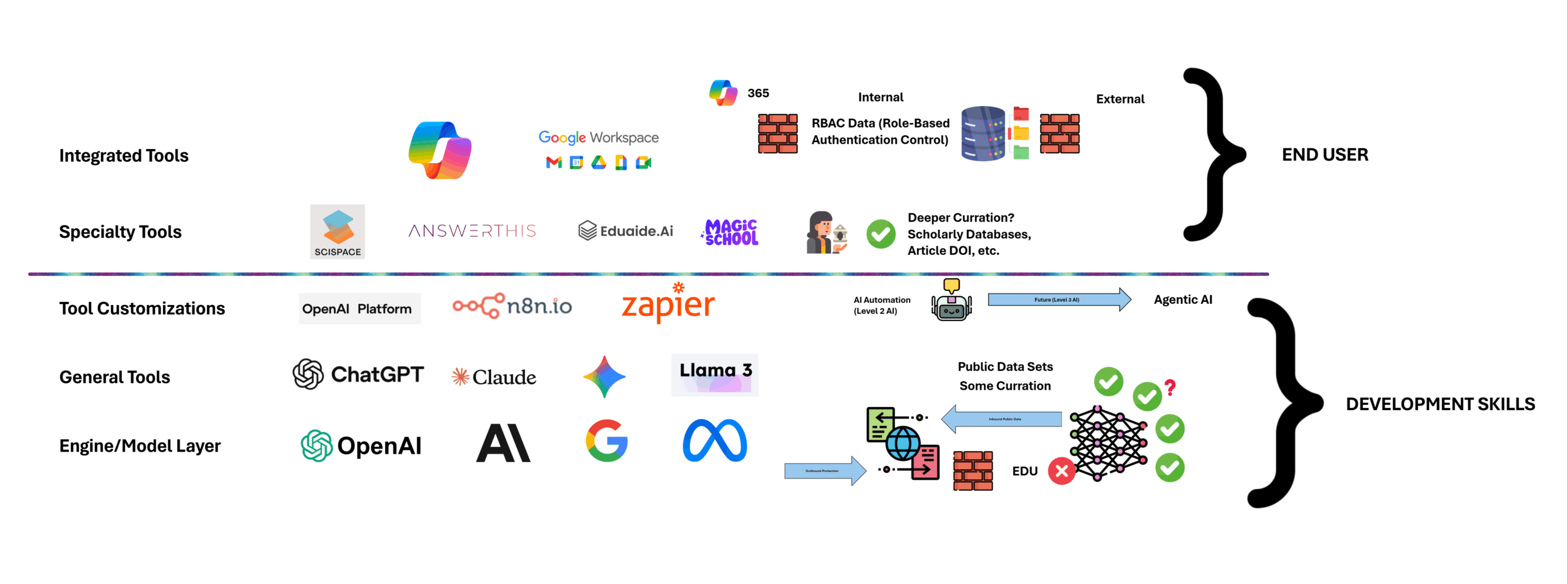
In the diagram above, you can see the layers of AI tool use as I see them.
Bottom Layer: LLM and AI Engines
At the bottom, we have the LLM (Large Language Models) and AI Engines that drive AI. For most users, this is not something they will touch directly. If they are a Developer, they may use APIs (Application Programming Interfaces) to connect to these services and build Applications.
General Tools Layer
In this layer, we find the tools that are currently recieving the most attention – specifically, Generative AI Tools like ChatGPT and others.
These have proven to be very interesting and captivating. The questions I have are: 1) How useful are they actually proving to be? 2) How easy is it to apply them to measurable outcomes?
Those are two connected questions, but it does strike me as telling that all of these tools require training in a separate skill set (prompt engineering) to become useful.
Tool Customization
We’ve seen some movement by both the AI Companies building “Apps” for their Generative Models as well as allowing users to create “Agents”, “Charms”, or other customizations.
This has led to the birth of AI Agencies and AI Automation. All very interesting, but also still a challenge for the massive amount of end-users just looking to be more productive.
Specialty Tools
It is at this layer that I see the users starting to get real benefit from AI. The line has been crossed from “Developer AI” to “User AI”.
The number of tools above this line has explode with both established and start-ups filling this space.
These are tools that are user-focused and have AI as an assistant or underlying support system. Grammarly for writing, AnswerThis for Research, and many more. These are full solutions that do not require the user to “learn” AI. They use AI to assist them with skills and processes they already have.
It is this layer that I believe has the most growth potential, but also will be very dynamic as the marketplace determines winners and losers.
It’s also an area that I try to focus on with my YouTube channel videos – demonstrating and reviewing tools for Education specifically.
Integrated Tools
In my opinion, I beleive these tools have the most potential for positive outcomes in using AI. From measurable results to productivity gains.
In these cases, the user isn’t required to learn an entirely new tool at best and/or an entirely new way of using a computer. They continue to use their existing expertise, but with AI enhancing their speed, summation, and depth of information use.
Is CoPilot better than ChatGPT
Recently, I published this video on my YouTube channel where I compare CoPilot365 (Integrated Layer Tool) to ChatGPT (General/Generative Tool).
Which tool should you use?
If you are looking to use AI to support your existing workflows and productivity – and, are using a Microsoft toolset – then using CoPilot makes the most sense.
CoPilot can use ChatGPT, but also has a far better integration with your own data and documents. It’s also more user-friendly and focused on directly assisting how you work.